
Elytra Flight HUD - Speed, Height & Durability
A client-side mod that displays a HUD panel while gliding with speed, altitude, ground distance, angle, elytra durability, and rocket count.
Flight Telemetry and Status Panel
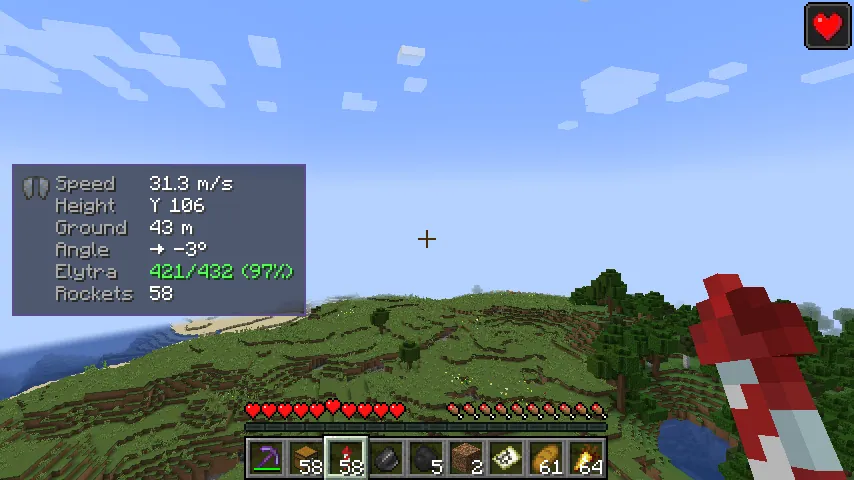
Elytra Flight HUD displays a dedicated information panel on your screen exclusively while you are gliding. The interface tracks your current speed in blocks per second, your Y-level height, and your flight angle with an up or down arrow to indicate climbing or diving. It also measures the distance to the ground below you, changing the indicator to yellow as you approach the terrain and red when you are about to land. To keep the screen uncluttered, the panel automatically hides as soon as you touch the ground, press F1, or open the F3 debug screen.
The overlay helps prevent mid-air accidents by monitoring your gear and propulsion supplies. It renders an icon of your equipped elytra alongside a color-coded durability readout that shifts from green to yellow to red, triggering a flashing low durability warning when wear becomes critical. Additionally, the panel counts the total firework rockets remaining in your inventory and turns the counter red once your supply is completely depleted.
Configuration Options
Players can customize the HUD layout and toggle individual metrics by editing a properties file. After launching the game for the first time, the mod generates the config/cleanelytrahud.properties file, as there is currently no in-game configuration menu. Every telemetry line is enabled by default, allowing you to selectively hide elements you do not need.
- Set enabled to true or false to toggle the entire flight panel.
- Change side between left and right (defaults to left), adjust offsetY (defaults to 0) to shift the vertical position, and alter scale (defaults to 1.0) to resize the display.
- Toggle individual data lines using showSpeed, showHeight, showGround, showAngle, showDurability, and showFireworks.
- Modify lowDurabilityPercent (defaults to 10) to define the exact durability percentage that triggers the flashing warning.
Compatibility, Servers, and Limitations
This is a client-side Fabric mod that functions on any multiplayer server and Minecraft Realms. Because it only reads standard local data like movement, coordinates, and loaded blocks without automating flight, it requires no server-side installation. To run the mod on Minecraft 1.21 or 1.21.1, your setup must include Java 21, Fabric Loader 0.16 or newer, and the Fabric API.
Certain flight calculations depend on chunk loading and how other mods implement gliding. The ground distance tracker only checks loaded chunks and displays a dash (-) when flying over unloaded terrain, while speed readings may briefly spike after lag or teleportation. Finally, the HUD supports vanilla elytra and modded wings that utilize standard gliding mechanics, meaning custom flight systems from other mods might not trigger the panel.
Questions
Does Elytra Flight HUD work on multiplayer servers?
Yes, it is a client-side only mod that works on any server and on Realms.
Why does the ground distance indicator show a dash (-)?
The mod can only check blocks in loaded chunks, so it displays a dash when you fly over unloaded terrain.
How do I move or resize the flight panel?
Open the config/cleanelytrahud.properties file and edit the side, offsetY, and scale values.
Will this HUD show up with modded wings?
It works with modded wings that use normal vanilla elytra flight, but mods with custom flying systems may not trigger the panel.
Related
A client-side camera mod that adds smooth perspective transitions and camera roll during elytra flight.

Overhauls elytra flight by allowing wing flapping, flaring, easy takeoff, and flight stamina using hunger.
Client-side utility mod adding keybinds to toggle elytra flight, trigger flight, and perform one-button firework takeoffs.

Adds a customizable elytra flight HUD showing optimal pitch angle, speed, altitude, and durability, with optional pitch-locking keybinds.

Client-side mod adding an avionics flight HUD, safety alerts, collision protections, and autopilot for elytra flying.
Client-side mod that displays a customizable HUD overlay showing current elytra durability while worn.

Calculates and displays the remaining flight time of an elytra based on its durability and Unbreaking level.
A client-side HUD mod that displays pitch indicators at +40 and -40 degrees, climb/dive cues, and void warnings while elytra gliding.