
Elytra Physics
Adds cape-like movement physics to the elytra while worn on a player's back.
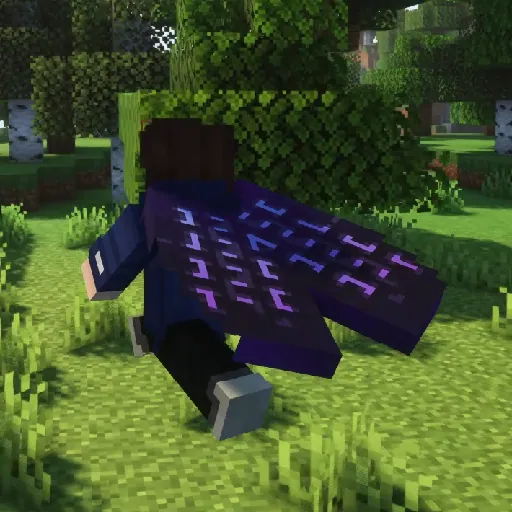
What Elytra Physics Changes
Created by ImJ0shh_ for Minecraft Java Edition, Elytra Physics applies dynamic, cape-like movement to the elytra when equipped on a player. In the standard game, wings remain rigid on your character's back while moving on the ground. With this mod installed, the wings sway and react to your movement as you walk or run, removing the stiff appearance.
Adding Compatibility for Custom Modded Elytras
Starting with version 2.0, players can configure the mod to support custom elytra layer renderers from other mods. While several requested mod compatibilities are already built into the configuration by default, you can manually add unsupported custom wings through the configuration files.
To register a custom elytra, you must find the layer renderer's classpath and add it to the 'inject_layers' list in the config file. The classpath consists of the package path shown at the top of the layer's .java file combined with the class name itself.
- Locate your configuration file: open 'elytra_physics-client.toml' if using Forge, or 'elytra-physics-config.json' if using Fabric.
- Find the 'inject_layers' list inside the file.
- Determine the target mod's layer renderer classpath by combining its package path and class name.
- Add the complete classpath string into the 'inject_layers' list and save the file.
Troubleshooting Mixin Conflicts
If you experience mixin conflicts alongside another installed mod, the issue is likely caused by the cape and elytra snapping fix feature. The recommended way to resolve this is to temporarily disable the conflicting mod, start Minecraft, and turn off the prevent snapping option using the in-game configuration screen.
Alternatively, you can disable the snapping fix manually by editing two separate text files outside the game. If you edit the files directly, you must update the 'prevent_snapping' setting in the main config file and also adjust the 'snapping_fix' flag inside 'elytra_physics_mixin-flags.txt'.
Questions
Why do modded elytras from other mods still look stiff?
They may require manual compatibility setup by adding their layer renderer classpath to the 'inject_layers' list in 'elytra_physics-client.toml' (Forge) or 'elytra-physics-config.json' (Fabric).
How do I fix a mixin conflict with another mod?
Disable the prevent snapping option via the in-game config screen, or manually turn off both 'prevent_snapping' in the main config file and 'snapping_fix' in 'elytra_physics_mixin-flags.txt'.
Related
A library mod and API that exposes vanilla elytra flight mechanics as an entity attribute for developers.

Overhauls elytra flight controls and camera movement with full pitch, yaw, and roll mechanics.
Allows players to customize elytras with dyes, banner patterns, armor trims, and glow ink sacs.

Adds craftable hang gliders with wind mechanics and upgradeable speed for gliding through the skies.
Adds a craftable hang glider with wind physics as an early-game scenic flight alternative to the elytra.
Allows players to apply armor trims, dyes, banner patterns, and glow ink to elytras.
A KubeJS addon that lets modpack developers assign custom cape and elytra textures to players via scripts.

A client cosmetics mod providing custom high-resolution capes, elytras, hats, and shoulder buddies.