
Gliders
Adds tiered craftable gliders made from wood, iron, gold, diamond, and netherite as early-game alternatives to the elytra.

Early to Mid-Game Flight Alternative
The Gliders mod introduces a balanced early-to-mid-game flying alternative so players do not need to rush to The End for an Elytra. Designed for both single-player and multiplayer worlds, these items help you explore caves, cross terrain, and avoid fall damage from cliffs. Unlike the Elytra, they are built to feel less overpowered while still offering progression through upgrades and custom first-person and third-person animations.
Five material tiers are available, ranging from basic wood up to iron, gold, diamond, and netherite. Wooden gliders serve as an entry-level option for learning flight basics, while iron and gold provide increased durability. Diamond tiers add significant durability and flight time, and netherite gliders offer the highest durability and longest flight duration available.
Crafting, Repairs, and Enchantments
Crafting any glider requires first making reinforced paper at a crafting table. You create this material by combining standard paper with leather, iron, gold, diamond, or netherite scrap, depending on the tier you want to build. Once you have the correct reinforced paper, you can assemble the glider itself.
Damaged gliders can be repaired at a smithing table before their durability hits zero and they break permanently. To restore a damaged unit, combine it in the smithing table with a new piece of reinforced paper that matches its original material tier. You can also extend a glider's lifespan by applying Mending and Unbreaking enchantments.
- Combine standard paper with leather, iron, gold, diamond, or netherite scrap in a crafting table to make reinforced paper.
- Use the reinforced paper to craft the corresponding glider tier.
- Repair damaged gliders in a smithing table using matching reinforced paper before durability reaches zero.
- Apply Unbreaking and Mending enchantments to increase longevity.
Flight Mechanics: Updrafts and Weather Hazards
Flying over fire and magma generates heat updrafts that boost your gliding altitude. When holding a glider near heat sources, wind particles will appear to indicate where you can catch a vertical boost over difficult terrain. However, flying in hot dimensions requires specific upgrades, as the intense ambient heat can otherwise overwhelm the glider.
Gliding during rain or thunderstorms is dangerous because the metal components attract lightning strikes. If you fly in open spaces during wet weather, you will hear a static tingling sound before lightning strikes you, which drops you from the sky and likely breaks the item. Players can modify their glider to replace the metal parts or apply a specific modification that turns lightning strikes into a beneficial upgrade.
Camera Controls and Mod Compatibility
An optional setting automatically switches your camera to third-person F5 mode whenever you start gliding. This wider perspective makes it easier to see your surroundings and dodge obstacles in tight spaces. It is disabled by default, but you can enable it at any time by going to Pause, Options, Controls, and toggling the Glider Perspective setting.
The mod includes built-in compatibility with both the Create mod and the Curios API. Integration with Create allows you to incorporate gliders into mechanical contraptions, transportation systems, and custom glider launchers. When using Curios, you can equip the glider in an accessory slot instead of sacrificing your chestplate armor slot.
Questions
How do I repair a damaged glider?
Combine the damaged glider with a matching piece of reinforced paper inside a smithing table before its durability reaches zero.
Can I put enchantments on a glider?
Yes, gliders support both the Unbreaking and Mending enchantments.
How do I gain altitude while gliding?
Fly over heat sources like fire and magma blocks, which produce visible wind particles and updrafts that push you higher.
How do I turn on the automatic third-person camera when flying?
Open the pause menu, navigate to Options, select Controls, and toggle the Glider Perspective setting.
Related
Adds craftable colorful wings worn in the Curios or Trinkets back slot that consume hunger while flying.
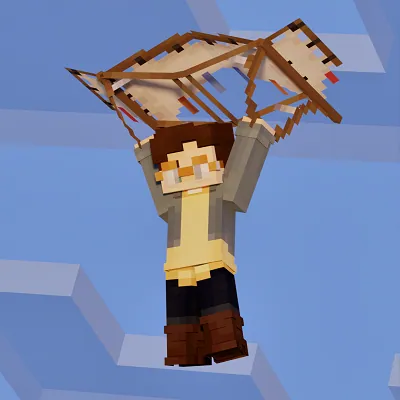
Adds tiered craftable gliders from wood to netherite as an early-to-mid-game alternative to the elytra.
Adds craftable hang gliders with wind mechanics and upgradeable speed for gliding through the skies.
Adds a craftable hang glider with wind physics as an early-game scenic flight alternative to the elytra.
A Create addon that adds a craftable mechanical wing glider with a wing-flap boost mechanic.

Causes the Ender Dragon to drop an elytra upon death at the location of the player who dealt the final blow.
Adds a craftable early-game wooden elytra that loses durability faster at higher altitudes and burns if flown too high.
Adds a crafting recipe to obtain the Elytra in survival mode.